Business accounts
Hubpay Connect: payment API integration for UAE businesses, connect your CRM and accounting software
UAE businesses waste hours reconciling payments manually between their bank, CRM, and accounting software. Hubpay Connect's RESTful API automates the entire flow trigger invoices, process payments, and auto-reconcile in Xero, QuickBooks, or Zoho Books. ADGM-licensed.
Updated on
5 min read

Hubpay Connect: payment API integration for UAE businesses
UAE businesses collectively lose thousands of hours per year re-entering payment data between their bank, CRM, and accounting software. A payment clears someone manually finds it in the portal, confirms the amount, matches it to the invoice in the CRM, marks it paid, and posts it to accounting. Then does it again for the next 49 payments. Hubpay Connect eliminates that entire workflow.
73% - of UAE SMEs still reconcile payments manually copying data between banking portals, CRM, and accounting software.
4–6 hrs - per week lost to manual payment matching and reconciliation for a business processing 50+ invoices monthly.
2.3% - average error rate on manually reconciled accounts each one triggering a correction cycle that compounds DSO.
What is Hubpay Connect?
Hubpay Connect is a RESTful API suite that allows UAE businesses to integrate their Hubpay business account directly with their CRM, accounting software, and e-commerce platforms. It enables payment links to be triggered programmatically from within business software, payments to be processed and settled into a Hubpay account, and transaction records to be automatically reconciled back into the originating system without any manual intervention at any stage.
Hubpay Connect is a payment API for UAE businesses that connects a regulated multi-currency account to CRM and accounting software, enabling automated invoice triggering, hosted payment collection, and real-time reconciliation from a single integration. It is built on RESTful architecture and is available to businesses on Hubpay's Scale and Treasury tiers.
Unlike a standard payment gateway that only handles the transaction layer, Hubpay Connect covers the full payment lifecycle from the moment an invoice is created in business software through to the reconciled entry in the general ledger. The integration is bidirectional: data flows from your CRM or accounting system to trigger payments, and settlement and status data flows back automatically once transactions complete.
The problem Hubpay Connect solves
Most UAE businesses using cloud accounting software Xero, QuickBooks, Zoho Books, Sage hit the same bottleneck. Their accounting platform is excellent at managing records. Their CRM is excellent at managing client relationships and billing cycles. But there is a gap between the moment a payment is due and the moment it is confirmed, matched, and posted. That gap is filled by manual work.
The workflow without API integration looks like this: an account manager creates an invoice in the CRM. They email a PDF to the client. The client eventually makes a bank transfer. Someone on the finance team checks the bank statement, identifies the incoming payment, matches it to the open invoice in the CRM, marks it paid, then posts it to accounting. If the payment is in a foreign currency, there is an additional step to record the FX conversion. Each step introduces latency and the possibility of error.
The hidden cost of manual reconciliation for UAE businesses: a professional services firm billing 60 clients per month across AED, USD, and EUR spends approximately 18-24 hours per month on payment matching and reconciliation. At a finance team cost of AED 150/hour, that is AED 2,700-3,600 per month AED 32,400-43,200 per year in pure administrative overhead, before accounting for the DSO impact of delayed invoice-to-cash cycles.
How Hubpay Connect works: the two core flows
Hubpay Connect supports two primary integration patterns, each mapped to a specific business type and payment workflow.
Use case 1
Software, SaaS, and professional services businesses, invoice-triggered payment flow
A software business or professional services firm needs to collect payment for a subscription renewal, project milestone, or one-off service invoice. Using Hubpay Connect, this entire process is triggered from within the CRM or accounting software and completes without any manual step.
Invoice triggered in CRM or accounting software. When a billing event occurs a subscription cycle, a milestone completion, a project close the CRM creates an invoice record. Via the Hubpay Connect API, this automatically generates a Hubpay payment link tied to that invoice.
Payment link sent to client. The payment link is embedded in an automated email or notification sent directly from the CRM. The client receives a branded, hosted payment page showing the exact amount and invoice reference. No PDF attachment, no bank details to copy.
Client pays on Hubpay's hosted payment page. The client completes payment via Visa, Mastercard, Apple Pay, Google Pay, or bank transfer. Multi-currency support means international clients can pay in their preferred currency the FX conversion to AED happens automatically within Hubpay.
Payment settled into Hubpay account. Funds settle into the business's Hubpay multi-currency account. A webhook fire immediately to the connected CRM confirming the payment reference, amount, currency, and timestamp.
Auto-reconciliation in CRM and accounting software. The webhook data automatically marks the invoice as paid in the CRM, posts the payment entry to the accounting system, and records the FX rate if a currency conversion occurred. The finance team sees a reconciled ledger with no manual input required.
Use case 2
E-commerce and online marketplace businesses, checkout payment flow
An online marketplace, tourism platform, or e-commerce business needs to embed a payment option at checkout that settles directly into their UAE business account and reconciles automatically with their order management and accounting systems.
Customer selects Hubpay as the payment option at checkout. The Hubpay Connect API is embedded into the checkout flow. When the customer selects it, a secure hosted payment session is initiated no card data touches the merchant's server at any point.
Payment processed on Hubpay's hosted payment page. The customer completes payment. Hubpay handles 3DS authentication, fraud screening, and card processing. International customers can pay in their home currency AED, GBP, EUR, USD, and 30+ others with FX conversion applied transparently.
Payment settled into Hubpay business account. Funds settle directly into the merchant's Hubpay account, typically same day. The transaction is tagged with the order reference passed from the checkout flow.
Auto-reconciliation across all connected systems. The webhook payload triggers automatic order status updates in the CRM, inventory adjustments in the order management system, and payment postings in the accounting software. Every system reflects the completed transaction within seconds of settlement with zero manual entry.
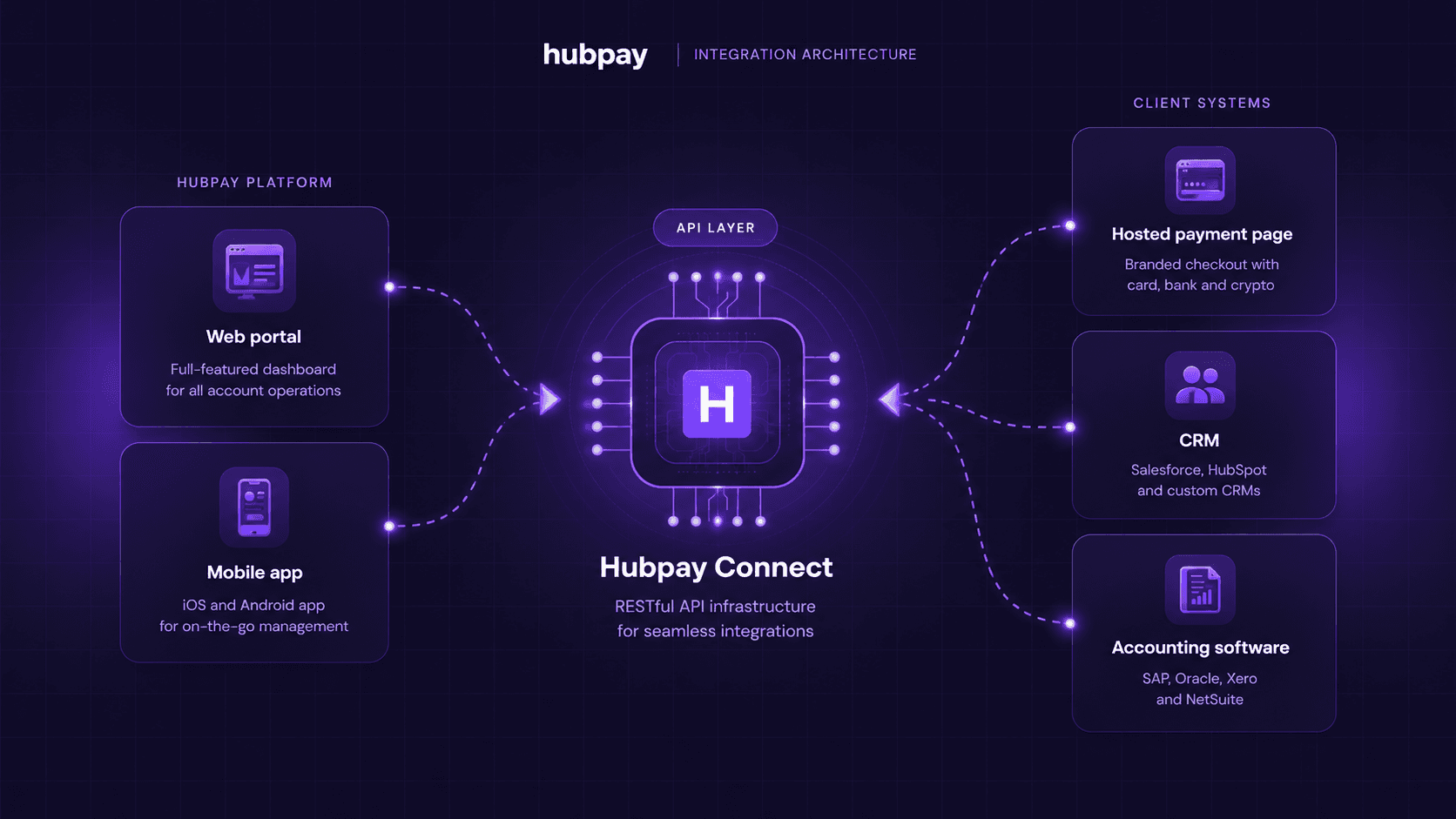
Hubpay Connect integration diagram
The diagram below shows how Hubpay Connect sits between your business software stack and the payment infrastructure covering both the inbound payment collection flow and the outbound reconciliation flow.
What Hubpay Connect connects to
Hubpay Connect is designed to integrate with the accounting and CRM platforms that UAE businesses already use. The most common integration targets in the UAE market are Zoho Books and Zoho CRM (dominant among UAE SMEs due to local data centers and built-in UAE VAT compliance), QuickBooks Online (widely used across professional services and trading companies), Xero (common among businesses with UK parent companies or accounting relationships), and Salesforce (used by larger enterprises with complex sales cycles).
Accounting software integrations - Zoho Books, QuickBooks Online, Xero, Sage, NetSuite. Payment settlements and FX conversion records post automatically to the general ledger, with VAT amounts itemised separately for UAE FTA compliance. Reconciliation matches to open invoices on receipt of the webhook.
CRM integrations - Zoho CRM, Salesforce, HubSpot, Microsoft Dynamics 365. Payment link generation is triggered from deal or contact records. Paid status, payment reference, and settlement amount are written back to the CRM record automatically on confirmation.
Manual payment processing vs Hubpay Connect, what changes
Step | Without Hubpay Connect | With Hubpay Connect |
|---|---|---|
Invoice creation | Created in CRM or accounting software. PDF emailed manually with bank details. | Invoice triggers Hubpay payment link automatically via API. Link included in automated client notification. |
Payment collection | Client makes a bank transfer. Finance team checks bank statement manually to confirm receipt. | Client pays on hosted payment page. Visa, Mastercard, Apple Pay, Google Pay, or bank transfer. Confirmed in real time. |
Matching payment to invoice | Manual matching, finance team finds the transfer in the bank statement, identifies the corresponding invoice, confirms amount and currency. | Automatic. The order reference passed through the API links the payment to the invoice with no human step required. |
Updating CRM | Finance team manually marks invoice as paid in CRM. Occasionally missed or delayed. | Webhook writes paid status, payment reference, and timestamp to CRM record within seconds of settlement. |
Posting to accounting | Accountant or finance team manually posts payment entry. FX conversion calculated and recorded separately. | Automatic posting to connected accounting software. FX conversion rate itemized in the entry for full audit trail. |
Multi-currency handling | Manual FX calculation, separate journal entries, risk of rate discrepancy between systems. | Hubpay converts at the transaction rate. The exact rate, base amount, and converted amount post to accounting automatically. |
Month-end reconciliation | Full manual review, bank statements vs CRM vs accounting. Typically 6-10 hours per month. | Systems are continuously in sync. Month-end review is a spot-check rather than a full reconciliation exercise. |
Who should use Hubpay Connect
Hubpay Connect is designed for UAE businesses that process a meaningful volume of invoices or transactions through a CRM or accounting platform and want to eliminate the manual work between payment collection and financial record-keeping. The integration makes the most impact in four types of business.
Software and SaaS businesses with recurring billing. Monthly or annual subscription renewals, usage-based billing cycles, or milestone-triggered invoices in any volume. The API allows every billing event in the CRM to automatically trigger a payment link, collect the payment, and confirm it with no finance team involvement in the routine cycle.
Professional services firms with project-based invoicing. Consultancies, law firms, agencies, and advisory businesses billing for time or project deliverables. Hubpay Connect handles the invoice-to-cash cycle across multiple clients, currencies, and billing schedules without the typical administration overhead.
E-commerce and online marketplace businesses. Tourism, hospitality, events, and product-based e-commerce platforms needing a UAE-regulated payment option at checkout that settles in AED and reconciles with their accounting system automatically. Particularly valuable for businesses with international customers paying in non-AED currencies.
Trading and distribution companies with high invoice volumes. Businesses receiving 50 or more supplier or customer invoices per month across multiple currencies where manual matching is already a significant operational overhead. The API integration turns reconciliation from a monthly exercise into a continuous background process.
Frequently asked questions
What is Hubpay Connect?
Hubpay Connect is a RESTful API suite that allows UAE businesses to integrate their Hubpay business account with their CRM, accounting software, and e-commerce platforms. It enables payment links to be generated programmatically from business software, payments to be processed on a hosted payment page, and settlement and reconciliation data to be written back automatically to connected systems. The result is a fully automated invoice-to-cash cycle with no manual data entry at any stage.
Which accounting software does Hubpay Connect integrate with?
Hubpay Connect is designed to integrate with the accounting platforms most widely used by UAE businesses, including Zoho Books, QuickBooks Online, Xero, Sage, and NetSuite. Payment settlements, FX conversion records, and VAT-itemised amounts post automatically to the general ledger upon receipt of the payment webhook. The RESTful API also supports integration with bespoke accounting or ERP systems built internally.
Which CRM platforms does Hubpay Connect support?
Hubpay Connect supports integration with major CRM platforms including Zoho CRM, Salesforce, HubSpot, and Microsoft Dynamics 365. Payment links can be triggered directly from deal or contact records within the CRM. When a payment is confirmed, the webhook automatically updates the invoice status, payment reference, and settlement amount in the corresponding CRM record.
How does auto-reconciliation work with Hubpay Connect?
When a payment is completed on Hubpay's hosted payment page, a webhook fires immediately to the connected CRM and accounting software carrying the payment reference, amount, currency, settlement timestamp, and FX rate where applicable. The connected system uses this data to automatically match the incoming payment to the open invoice, mark it paid, and post the accounting entry. No manual matching, no CSV export, no copy-paste between systems. The entire reconciliation cycle happens within seconds of payment confirmation.
What payment methods does Hubpay Connect support at checkout?
Hubpay Connect's hosted payment page supports Visa, Mastercard, Apple Pay, and Google Pay for card-based payments. Bank transfer via local UAE rails and international SWIFT/SEPA transfers are also supported. For e-commerce and marketplace integrations, the checkout can display the payment methods most relevant to the customer's location and device.
Open a free multi currency account with Hubpay
We help companies all around the globe to send money in the easiest and cheapest way using multiple currencies. Talk to Hubpay Corporate FX team today
Share this blog on